
Add Upstream Polyline Count
Summary :: Usage :: Parameters :: Outputs :: Warnings :: Limitations :: Code sample
Summary
Adds a new field recording the number of upstream polylines for each polyline within the river network. This tool works with single- or multi-threaded networks.
Usage
This tool adds a new numeric field called US_LinCnt which is the total number of upstream polylines for each polyline. This simple count can sometimes be referred to as the Cumulative Upstream Segment Count, Topological Accumulation or Link Magnitude. Such a value could be used to weight the polyline in further analysis or allow you to relate a hydrological/ecological phenomenon with its position in the wider river network.
If the field exists it creates a new field with a simple numeric suffix. Any selection on the input layer is cleared and then the tool processes all polylines in the river network.
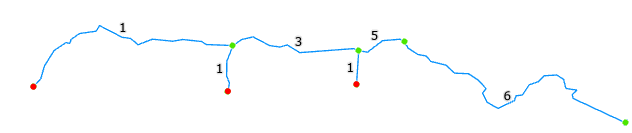
The count includes the polyline itself. If your river network contains pseudo nodes then the count will honour the true number of polylines, see image below for further information.
|
|
|
A simple scenario of polyline counting encoded into US_LinCnt. Red points are source nodes and green are all other nodes. Note the pseudo node (right of #5) means this inter-tributary segment is actually two polylines which are correctly counted. |
|
|
|
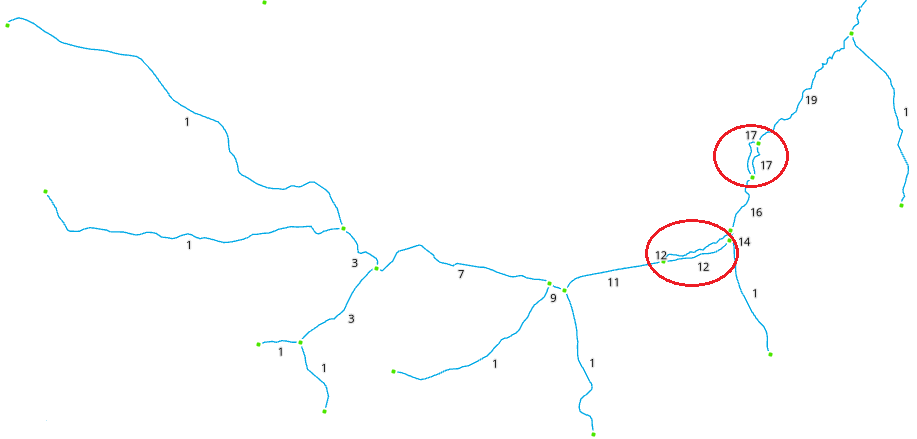
This example shows how RivEX resolves counting in a network with loops (highlighted in red). |
For comparison, the count of polylines that this tool creates is equivalent to the upstream cell count as described by Betz, et al., 2017.
Parameters
|
Name |
Help |
Data type |
|
River Network |
The river network. For best results the network should be within a File GeoDatabase |
Feature Layer |
Outputs
An updated river network with a new numeric field (US_LinCnt) recording the total number of upstream polylines for each polyline. The count includes the polyline itself. If you wish to know the actual total upstream lengths for each polyline, then use this tool.
 Warnings
With the release of ArcGIS Pro 3.2.1 a switch control appears on parameters that accept tables\feature classes, do not interact with it! More advice here.
When this tool is used in a script the river network parameter must be a full path to the Feature Class and not a layer object, see advice here.
Limitations
- Any selection on the input layer is cleared and then the tool processes all polylines in the river network.
- River network must not be a compressed dataset.
Code sample
A minimum code example showing how to call this tool in a python script. This can be run in console or your preferred IDE. If you right click on the tool in the RivEX toolbox and select properties you can view parameter order.
import arcpy
# Import RivEX toolbox
arcpy.ImportToolbox(r"C:\RivEX_ArcPro\RivEX.atbx")
try:
# Input river Feature Class
fc = r"C:\Temp\ORN\ORN.gdb\ORN"
# Run RivEX tool
res = arcpy.scrCountUSPolylines_RivEX(fc)
# Show output Feature Class name which is same as input
updatedfc = res.getOutput(0)
print(updatedfc)
except arcpy.ExecuteError:
print("FAILED to add Upstream polyline counts")
