
Simplify the network to a single thread network
If you have encountered an 056 error code this indicates your river network contains loop or divergent junctions (nodes). You will need to remove one side of the loop in all loops and\or edit the network to remove the divergent node.
Removing loops
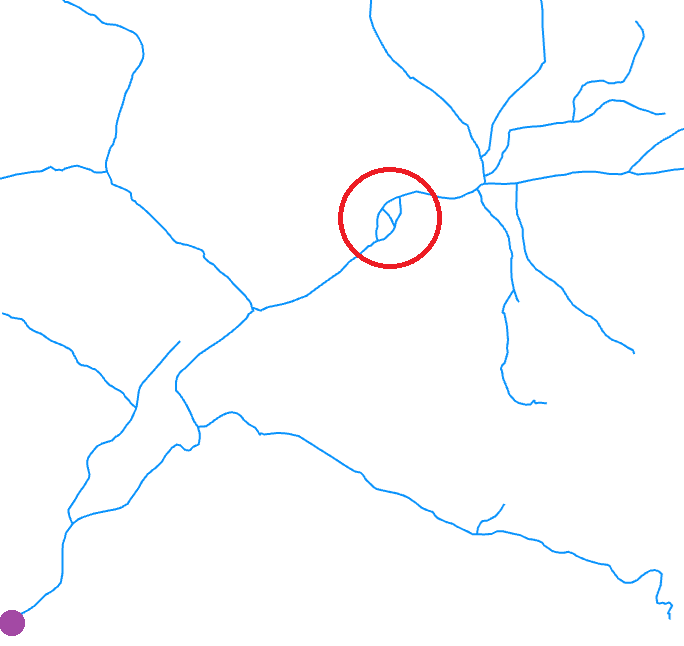
The red circle identifies a multi-thread section creating a loop, purple point is the mouth of the network. Your network may
potentially have thousands of such loops and impractical to manually edit out. A possible solution is discussed below.
If it is the first time you have encountered this error message it is likely you have not turned your network from a multi-thread network to a single-threaded network. If you are very lucky your network contains attribution that identifies loops which you can use to delete out one side of the loop. Most networks wont have such attribution, so how do you collapse loops to a single channel? If you are working within a single catchment you could manually select up one side of the loop and delete out the polylines. RivEX has a tool that can be used to identify loops but you would still need to simplify the loops.
What if your network is very large with potentially many hundreds to thousand of loops? A trick to bulk process a whole network is to add Shreve order to the network and delete out all polylines that have Shreve order of zero. Be aware the assignment of Shreve is based upon row order so you could inadvertently delete out a main channel whilst retaining connectivity via a minor parallel drainage channel. A situation you may not want. You could manually check the assigned Shreve order and swap values within the loop before you attempt to drop zero order channels. A worked example in simplifying your network to a single threaded network using this approach is discussed on this page.
Removing divergent nodes
RivEX classifies nodes into 1 of 6 types. Tools that expect the network to be single threaded will check the network for the existence of nodes which are type B (confluence & divergent) and D (divergent). Any nodes found with these types are typically one end of a loop but its possible to get divergent nodes near the mouth of the network caused by drains, connections into canals, erroneous directions and deltaic sections, an example is shown below.
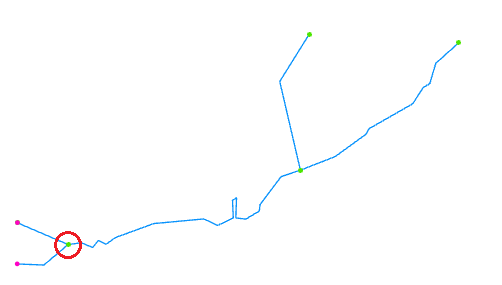
The two purple nodes are mouth nodes, one created by a line flowing in the wrong direction and requires flipping.
The green node circled is a divergent node and this node will cause RivEX tools to abort if a single threaded
network is required by the tool.
How would you resolve a divergent node? In the simple example above you have two options: delete out the line that is flowing in the wrong direction or flip the direction of the line and turn it into a tributary that is flowing into the node rather than away from it. Which option you take depends on why the divergent node exists. Regardless of which editing route you choose you will need to rebuild the topology of the network so RivEX sees the changes.