Self-intersecting polylines
•Self intersection is usually a result of poor digitising. They can be hard to spot if the intersection is very small. Experience has shown that it is typically the misplacement of a single vertex.
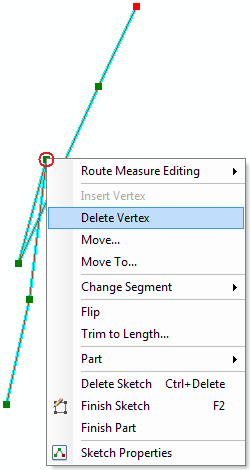
•A self-intersecting polyline can be corrected by entering edit mode and show the vertices ( ). You can right click on the incorrect vertex and delete or move it or use the tools on the Edit Vertices tool bar to correct it. RivEX has a tool that will auto-correct self intersections which is discussed here.
•In the example image below a single vertex is misplaced (red circle). Delete vertex has been selected from the context menu.
•This tool generates an error log file called SelfIntersectingPolylines.txt